

Contributing Translations to Askimo
이 콘텐츠는 아직 번역되지 않았습니다.
Askimo is available in English, Chinese (Simplified & Traditional), Japanese, Korean, French, Spanish, German, Portuguese, and Vietnamese. If you speak another language, your help means a lot. Even fixing a single awkward phrase makes a difference for someone using the app every day.
Translations are managed on Crowdin. No coding, no pull requests, no local setup required.
How to Start
Section titled “How to Start”- Create a free Crowdin account (or sign in with GitHub or Google)
- Select your language from the project page
- Pick any file and start translating strings in the online editor
- Your contributions are reviewed and merged into the app periodically
That’s it. Crowdin shows translation progress per language and highlights missing or outdated strings so you always know where help is needed most.
Tips for Good Translations
Section titled “Tips for Good Translations”Keep placeholders intact
Section titled “Keep placeholders intact”Some strings contain placeholders like {0} or {1}. These are filled in by the app at runtime with things like a username, model name, or number. You must keep them in your translation, though you can move them to a different position in the sentence if your language requires it.
# Englishchat.provider.model=Provider: {0}, Model: {1}
# Japanese (reordered)chat.provider.model=モデル: {1}、プロバイダー: {0}
Match the tone
Section titled “Match the tone”Askimo uses a friendly but professional tone, like a knowledgeable colleague rather than a corporate manual. Avoid overly formal or stiff phrasing where natural language sounds better.
Short UI strings matter most
Section titled “Short UI strings matter most”Buttons, labels, tooltips, and menu items are what users see constantly. If you have limited time, start there. They have the biggest impact on how polished the app feels.
When you’re unsure, leave a comment
Section titled “When you’re unsure, leave a comment”Crowdin has a built-in comment system on every string. If the source text is ambiguous or you’re not sure about the right term, leave a comment. Other translators and the maintainers can weigh in before anything goes live.
Adding a New Language
Section titled “Adding a New Language”If your language isn’t listed on Crowdin yet:
- Open a GitHub Discussion to request it
- Mention the language name and its code (e.g.
arfor Arabic, orar_SAfor Arabic, Saudi Arabia) - Once the language is added to the project, you’ll be notified and can start straight away
Checking the Result
Section titled “Checking the Result”Once your translations are merged, you can see them in the app under Settings → Application Language.
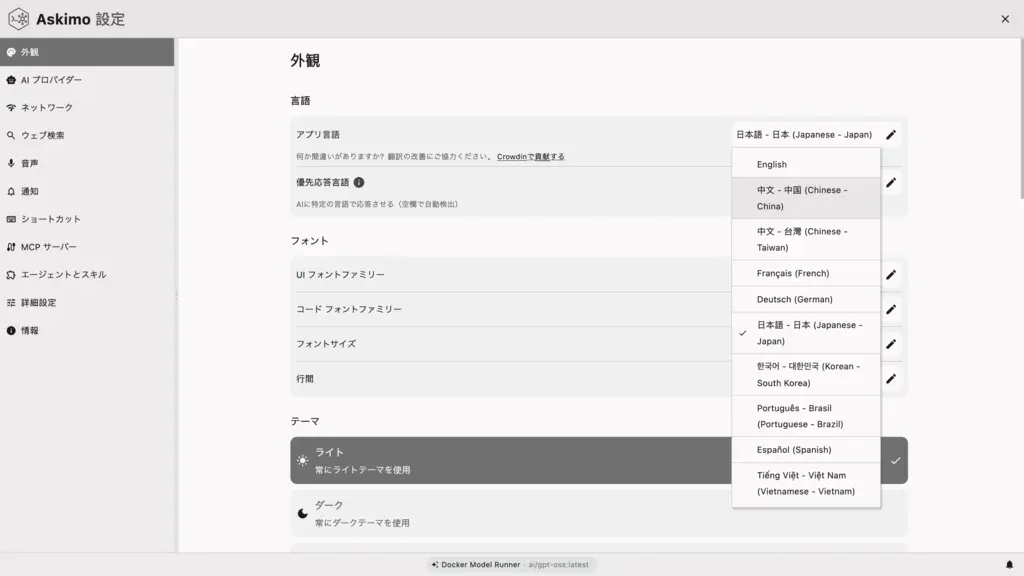
Missing translations fall back to English, so nothing will break. If you spot a key name showing up instead of real text, it means a string hasn’t been translated yet.
Resources
Section titled “Resources”Thank you for helping make Askimo accessible to users around the world. 🌍